Keylight
Every keyboard shortcut, one keystroke away
Funkcje
Instant Access
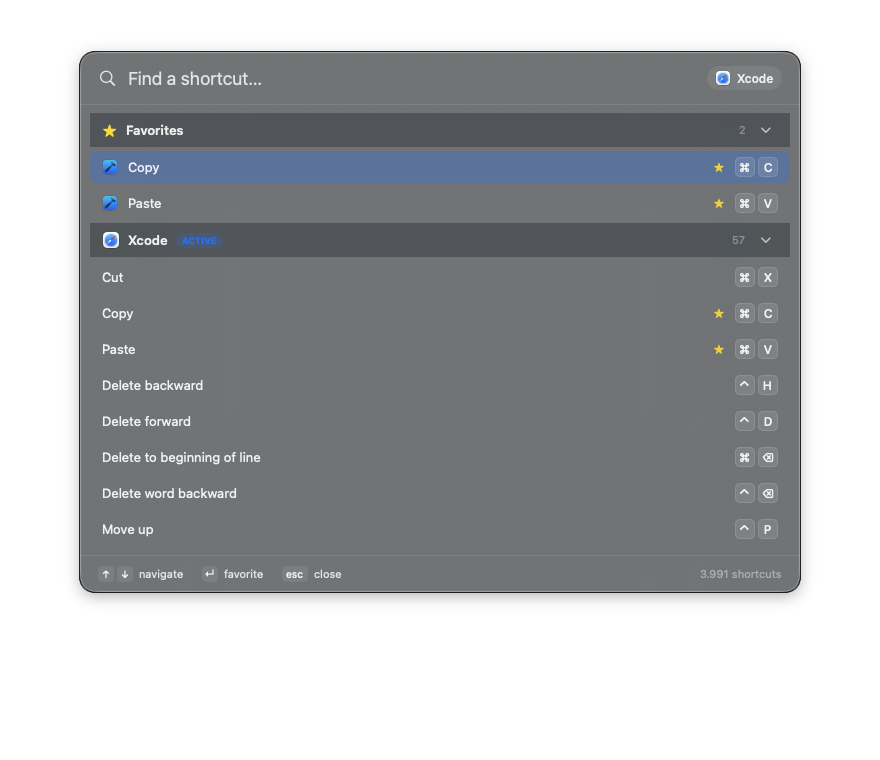
Press ⌘⇧Space from any app to summon a Spotlight-style panel. Press it again to dismiss.
Knows Your App
The app you're using appears first, in full color. Every other app stays one search away.
60+ Apps Built In
Xcode, Safari, VS Code, Figma, Photoshop, Notion, Slack and dozens more — plus system-wide macOS shortcuts.
Fuzzy Search
Type what you want to do. Keylight searches thousands of shortcuts from every app at once.
Favorites
Star the shortcuts you use most so they're pinned to the top every time.
Keyboard-Driven
Arrow keys to navigate, Return to favorite, Escape to dismiss. Your hands never leave home row.
Lives in the Menu Bar
No Dock clutter. Keylight waits in your menu bar and launches at login if you want.
Free & Private
Completely free, no account, no tracking. All data ships inside the app and works offline.
O aplikacji Keylight
We all know ⌘C and ⌘V — but every Mac app hides dozens of shortcuts that would save you seconds, a hundred times a day, if only you could remember them. Keylight fixes that.
Press ⌘⇧Space and Keylight slides in like Spotlight, showing the shortcuts for whatever app you're in right now, front and center. Start typing to search thousands of shortcuts across more than sixty apps, star your favorites, and close it the instant you're done. It lives in your menu bar, works completely offline, collects nothing, and costs nothing. Shortcut data is sourced from the open-source hotkys project (MIT).
Może Ci się spodobać
OBS 4K
Profesjonalne strumieniowanie kameryZamień iPhone'a w kamerę 4K dla Maca z ultraniskim opóźnieniem H.265.

Elegant Tasks
Planer i analitykaPiękny menedżer zadań z analityką AI, projektami i inteligentnymi listami.

Easy Scan
Skaner dokumentówNatychmiastowe skanowanie dokumentów. Automatyczne wykrywanie krawędzi, eksport PDF, OCR.